Wake on LAN
You can switch off your desktop computer at ENS when you leave ENS even if you are going to need it later at home. Power consumption of a desktop computer: about 50 W when idle.
In the Bios of your desktop computer at ENS, check that the option “wake on LAN” is activated.
On your desktop computer at ENS, in your session, in “Advanced Network Configuration”, for the wired connection, in the wake on LAN settings, uncheck default and check magic.
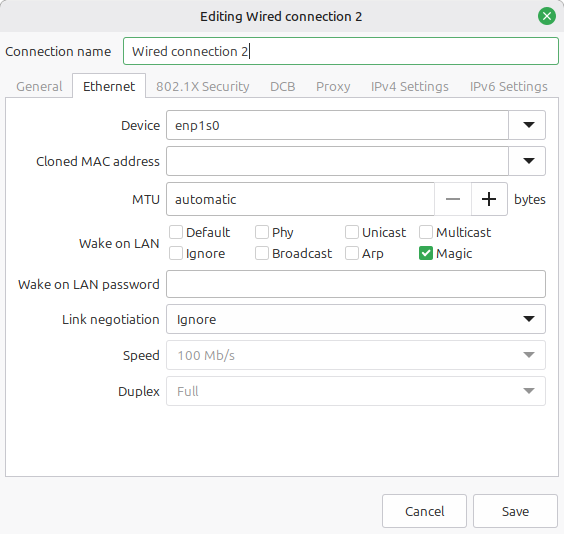
At home, when you need to switch on your desktop computer at ENS, you type the following command:
(computer at home) $ ssh verdi.ens.fr wakeonlan -i 129.199.71.255 <mac-address>
where <mac-address> is the MAC address of your desktop computer at ENS.